
RiteType

Typing posture: how to sit at the keyboard

Last updated · 3 min read

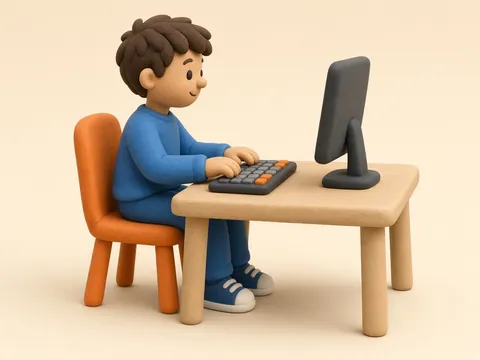
  1. Clay kid at a desk with both feet flat on the floor
    Step 1
    Feet flat

    Put both feet flat on the floor. If they don’t reach, rest them on a box or a stack of books.

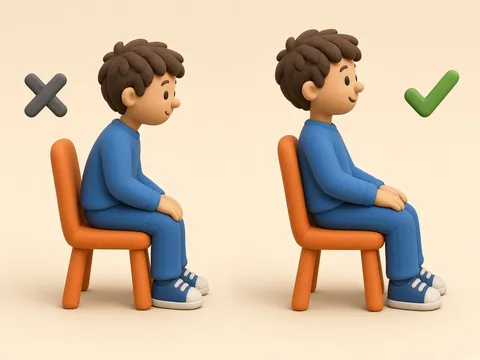
  2. Two clay kids on chairs: one slouching on the front edge (X), one sitting back against the chair, tall and straight (check mark)
    Step 2
    Sit back and tall

    Scoot back so the chair holds your back. Sit up tall, like a string is pulling your head up.

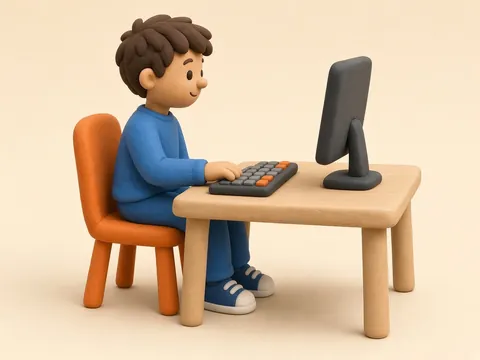
  3. Clay kid typing with the arm in an L: upper arm down at the side, elbow bent, forearm level, wrist straight
    Step 3
    Elbows bent, wrists floating

    Let your shoulders relax. Bend your elbows like the letter L. Keep your wrists straight and floating, not leaning on the desk.

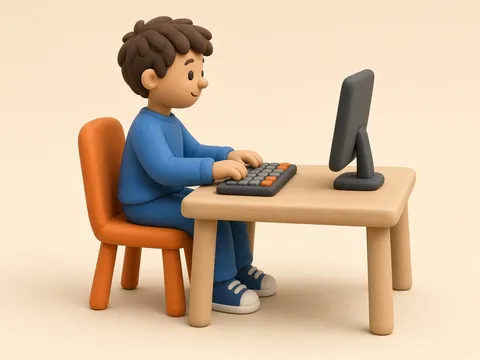
  4. Clay kid looking straight ahead at a screen about an arm's length away
    Step 4
    Screen at eye level

    Look straight ahead at the screen. It should be about an arm’s length away.

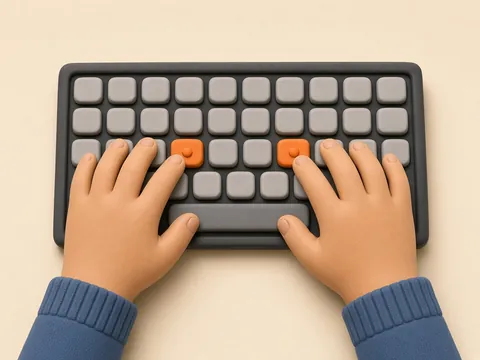
  5. Two clay hands on the keyboard home row, index fingers on the orange F and J keys with bumps
    Step 5
    Fingers on home row

    Feel for the little bumps on F and J. Pointer fingers go there, and the other fingers rest next to them.

Good typing starts before the first key. How you sit changes how comfortable you feel and how easily your fingers reach the keys. The tips below follow the computer workstation advice from OSHA and Mayo Clinic. They work for kids and adults.

1. Feet flat

Rest both feet flat on the floor, with your thighs about level and your knees about as high as your hips. If your feet don't reach (common for kids at a grown-up table), use a footrest, a small stool or a stack of sturdy books.

2. Sit back and tall

Sit back so the chair supports your back. You can sit upright or lean back slightly. Keep your head level, facing forward and in line with your body, instead of leaning toward the screen.

3. Elbows bent, wrists straight

Let your shoulders relax and your upper arms hang at your sides. OSHA suggests keeping your elbows close to your body and bent between 90 and 120 degrees, with the keyboard at about elbow height. Keep your hands, wrists and forearms straight and in line. While you type, keep your wrists lifted a little instead of leaning them on a hard desk edge, which can press on your forearms and wrists.

4. Screen at eye level, about an arm's length away

Put the screen straight in front of you, behind the keyboard. Mayo Clinic suggests about an arm's length away (between 20 and 40 inches, or 50 to 100 cm), with the top of the screen at or slightly below eye level. A screen that is too high makes you tilt your head back. On a laptop, a stand plus a separate keyboard gets you closer to this setup.

5. Fingers on the home row

Find the small bumps on F and J with your index fingers. Rest your left fingers on A S D F, your right fingers on J K L ;, and your thumbs on the space bar. The finger placement guide shows which finger presses every key.

Move around

No posture is good for hours at a time. Both OSHA and Mayo Clinic recommend changing position often: stretch your fingers, hands and arms, and stand up and walk around for a few minutes now and then. RiteType lessons are short, so a lesson is a good point for a quick stretch.

Sources

RiteType · ritetype.com

Sit like a typing pro

  1. Clay kid at a desk with both feet flat on the floor
    1
    Feet flatPut both feet flat on the floor. If they don’t reach, rest them on a box or a stack of books.
  2. Two clay kids on chairs: one slouching on the front edge (X), one sitting back against the chair, tall and straight (check mark)
    2
    Sit back and tallScoot back so the chair holds your back. Sit up tall, like a string is pulling your head up.
  3. Clay kid typing with the arm in an L: upper arm down at the side, elbow bent, forearm level, wrist straight
    3
    Elbows bent, wrists floatingLet your shoulders relax. Bend your elbows like the letter L. Keep your wrists straight and floating, not leaning on the desk.
  4. Clay kid looking straight ahead at a screen about an arm's length away
    4
    Screen at eye levelLook straight ahead at the screen. It should be about an arm’s length away.
  5. Two clay hands on the keyboard home row, index fingers on the orange F and J keys with bumps
    5
    Fingers on home rowFeel for the little bumps on F and J. Pointer fingers go there, and the other fingers rest next to them.
  6. ★
    Take breaksStand up, stretch your hands and arms, and walk around now and then.

Tips based on OSHA and Mayo Clinic computer workstation guidance.

Start lesson 1 →

Frequently asked questions

What is the correct posture for typing?

Sit back in your chair with your feet flat on the floor (or on a footrest), your head level and your shoulders relaxed. Keep your elbows close to your body and bent at about 90 to 120 degrees, your wrists straight, and the screen about an arm's length away with its top at or slightly below eye level.

Should my wrists rest on the desk while I type?

Try not to lean them on a hard desk edge while you type. Keep your wrists straight and in line with your forearms. Pressing on a hard edge can cause contact stress. If your desk has a hard edge, pad it or use a soft wrist rest when you pause.

How far away should the screen be?

About an arm's length. Mayo Clinic suggests no closer than 20 inches (about 50 cm) and no farther than 40 inches (about 100 cm), with the top of the screen at or slightly below eye level.

My child's feet don't reach the floor. What should we do?

Give them something to rest their feet on, like a footrest, a small stool or a stack of sturdy books, so their feet are supported and their thighs are about level.

How often should we take breaks?

Often. Even good posture gets tiring if you hold it too long. Stand up, stretch your hands, arms and back, and walk around for a few minutes from time to time.